XP-Pen Artist13.3 Review In Few Words (Mini Review) XP-Pen Artist13.3 is one of the most affordable Cintiq alternatives out there, price-wise. It’s really a good choice if you’re cash-strapped, as long as you don’t mind drawing on a smaller screen, as adding a bit more money can get you few inches of screen space (up…
Huion KAMVAS GT-156HDV2 review Drawing Monitor Pen Display & Cintiq Alternative – (15.6-inch Screen)
KAMVAS GT-156HDV2 Review In Few Words (Mini Review) KAMVAS GT-156HDV2 has the same 8192 levels of pressure sensitivity. The 15.6 inches screen will provide you with a good drawing space compared to the smaller pen displays, while still being small enough to be carried around with some efforts. The screen resolution of 1920 X 1080…
GAOMON PD1560 review a 15.6 Inch pen display & Cintiq Alternative & 10 hot Keys
GAOMON PD1560 Review In Few Words (Mini Review) Generally speaking, I quite like what GAOMON PD1560 can provide at this price point. It has a good drawing area, with a good screen resolution of 1920 X 1080 (though some artists way prefer more). The pressure sensitivity is good as well (though you shouldn’t care much…
Huion KAMVAS GT-191 Review Digital Graphics Drawing Monitor 8192 Pen Pressure 19.5 Inch HD Pen Display for Windows and Mac PC
Huion KAMVAS GT-191 Review In Few Words (Mini Review) Here comes the successor to GT-190 (reviewed here), the good Cinitq Alternative that I complimented back in the day, but this time with a 1080P resolution on the 19.5 panel, higher pressure sensitivity, which is not an important feature, but is very nice to have. The…
Mega Cintiq Comparison:- Cintiq Pro 13 VS Cintiq Pro 16 VS Cintiq Pro 24 VS Cintiq Pro 32 VS Cintiq 22HD VS Cintiq 27QHD VS Cintiq 13HD Comparison
Let Me Help You Pick The Right Cintiq Model Picking the right Cintiq model can be a bit tricky. While having a certain budget may filter out some of the older models for you, you could be still end up with few models to pick from. For that reason, I made this comparison of various…
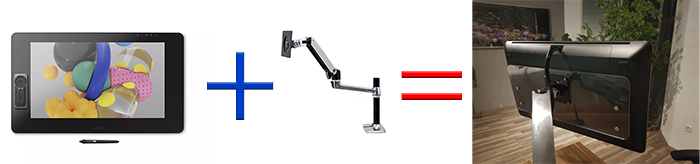
How to mount Cintiq Pro 24 to an Ergotron arm (or to a VESA mount) using an adapter
The Lack Of VESA-Compatible Mount In Cintiq Pro 24 Was A Bummer, Here’s How To Get Around This Update:- There’s one commercially available VESA adapter for Cintiq Pro 24, which you can find in the following Amazon links:- #CommissionsEarned Out of the box, Cintiq Pro 24 comes with a built-in legs. These legs allow you…
Digital drawing & painting programs comparison:- Adobe Photoshop CC VS Paint Tool Sai
Photoshop CC VS Paint Tool Sai:- Which One Is Better? Both Photoshop & Sai are widely used to create great artworks by many artists. So I won’t delve much into what you can do with them, as it’s easy to see that Photoshop could do more, but there are other criteria that could make difference….
The new Cintiq Pro 24 review, an excellent 4K creative pen display for your drawing needs (DTK-2420 DTH-2420).
Cintiq Pro 24 Review In Few Words (Mini Review) There has been a lot of excitement over the new Cintiq Pro 24-inches, as artists waited for them for quite a while. The anticipation of a large Cintiq that supports 4K, and one that support different display ports. Yes, unlike the previous Cintiq Pro 13 &…
Is Cintiq Pro Engine Creative PC module Worth it? Or should you build a PC instead (with comparison with two PC builds & laptop)
Is The Cintiq Pro Engine Creative PC Module Worth It Cintiq 24 With Wacom introducing the Cintiq Pro 24, and its 32-inch counterpart, they also introduced the creative PC module with it, a PC module you attach to the back of each of the two Cintiq 24 & 32 models. It contains a full-fledged PC…
The New Intuos 2018 Review, with a detailed comparison of the different 3 models (CTL4100, CTL4100WLK0, CTL6100WLK0).
New Intuos 2018 Review In Few Words (Mini Review) The new Intuos 2018 are a good entry-level graphics tablets for those willing to get into digital art. The small model with no Bluetooth (CTL4100) is particularly good if you want to have an affordable Wacom tablet, its price is a bit close in price to…
Is it good to draw girls only? Or to focus on drawing one thing in particular?
Should You Focus On Drawing Girls Only? Or To Focus On Drawing On Thing In Particular “You should draw something other than girls” You have likely heard something along these lines many times, usually without specifying why or what are the things you should draw instead. Making an advice like this a bit confusing for…
Cintiq Pro 32 Release Date Is Finally There
After Wacom Finally Announced Cintiq Pro 24, The Cintiq Pro 32 Release Date Is Getting Closer Update:-Cintiq Pro 32 is expected to be out around 29 October 2018, you can pre-order it from the following B&H link:- Pre-Order Cintiq Pro 32 Now This is not the first time Wacom release the small Cintiq Pro model…
Can you use Photoshop for digital art & drawing?
Can You Use Photoshop For Digital Art. & Drawing, And Why? If you’re asking this question, chances that you’re new to digital art, or that you use another drawing & painting program, and you wonder if Photoshop can be used for digital art. The short answer is yes, you can use it for that. There…
What’s wrong with Wacom drivers And Their Issues? And what are the alternatives?
Wacom Drivers Have Been Giving Artists A Hell If you are a user of a Wacom’s graphics tablets or pen displays they produced in the last few years. Chances that you encountered some of the driver issues they have been having for a while now. Sometimes the driver doesn’t work, or simply can’t find your…
Tired Of Wacom? Don’t find digital drawing comfortable? Try drawing with The iPad Pro
The iPad Pro Is A Great Way To Get Into Digital Art, And A Good Alternative To Wacom As Well Whether you’re a traditional artist who doesn’t like digital art. Or a Wacom user who’s tired of their drivers. The iPad Pro is a good alternative that’s easy to use. Specially if you are all…
How to get 4K out of your 16-inches Cintiq Pro. Using Displayport or USB-C
Here’s How To Get The Most Out Of Your Cintiq Pro The 16-inch Cintiq Pro supports a high resolution up to 4K. You probably got your Cintiq Pro, unboxed it & plugged it to your computer. Only to see the resolution is less than 4K (Usually 1440, also known as QHD). And that you can’t…
A common solution to many Wacom drivers issues. Like no pressure and supported device no found (for Windows 7 And 10)
Restarting Wacom Service Is A Good To Many Wacom Drivers Issues. Like Having No Pressure And Supported Device No Found (For Windows 7 And 10) This solution works for a lot of cases, like when Wacom driver fails to see your device, with a message like:- A Supported Tablet Was Not Found On The System…
How much Wacom nibs lasts? And how to make your graphics tablet nibs last longer
So You Got A Wacom Tablet (Or Another Brand), And You Wonder How Much Your Nibs Will Last? So, you have been using your Wacom tablet for a while now, or you’re a seasoned graphics tablet user that got a new tablet with a more rough surface than your previous one. And you wonder how…
Do we really need a 32-inches Cintiq? Is it really too big?
Let’s Discuss Whether The 32-Inch Wacom Cintiq Pro Is Worth It In mid-2017, Wacom announced they were going to release a 24-inches & 32-inches Cintiq Pro models. The models are expected to come this year. The date is not certain, as Wacom said in a Tweet here (11 January 2018):- Hi, we do not have…
Cintiq Pro VS MobileStudio Pro – What are the key differences between the two. And which one to get?
Cintiq Pro Or Mobilestudio Pro, Which One Is Better For You? So you are looking for buy a pen display, but you don’t know which one to get? And whether there are differences between the two? You came to the right place. The key difference is that the MobileStudio Pro is a full-fledged Windows Machine….